Table of contents
Open Table of contents
What a Pointer Really Is
As programmers, we work with pointers constantly. We look in our debugger and see an address like 0x7FFAC44B1A20 and assume it represents a specific location on the computer’s RAM.
This is a simplification.
That address doesn’t point to a physical location on your RAM. It’s a virtual address, meaningful only within your program’s virtual address space. Every memory access your program attempts is mediated by the Operating System (OS) and the Memory Management Unit (MMU). Understanding this abstraction is essential for low-level performance work.
Life Without Virtual Memory
To understand why we need it, let’s look at the problems it solves. Early operating systems allowed programs to speak directly to physical RAM. This created significant challenges.
Problem 1 - The Shared Physical RAM
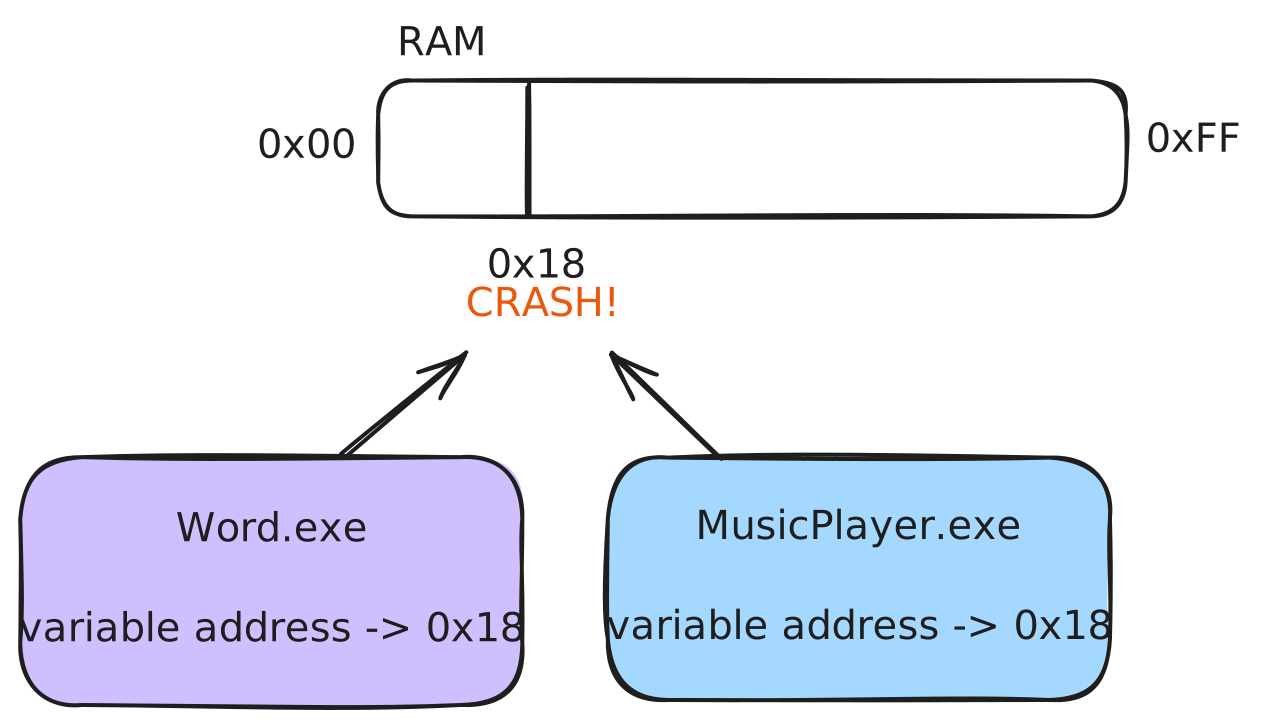
In this model, all programs and the operating system itself shared one single, global address space. This created two critical issues, address collisions and a lack of protection.
Address Collisions
If memory is global, every address must be unique across the entire system.
When you compile a program, the compiler and linker often assume specific memory addresses for functions and variables. If Program A assumes its main function is at 0x401000 and Program B assumes the same, you cannot run both simultaneously. The OS would have to overwrite the first program to load the second. This lack of “relocatability” made running multiple applications difficult.
Lack of Protection
Even if addresses did not overlap, direct access to physical memory meant a simple bug could crash the entire system.
- Corruption A bug in one program could accidentally write to memory owned by another program. This causes silent data corruption that is difficult to debug.
- System Crashes If a buggy pointer wrote to memory owned by the operating system (like the process scheduler or device drivers), the entire machine would crash.
There was no mechanism to enforce boundaries between applications.
Problem 2 - External Fragmentation
This is a major inefficiency in direct physical memory management.
Step 1 Your computer starts with 8MB of free RAM.
[------------------------------ Free (8MB) ------------------------------]Step 2 You launch Program A (1MB), Program B (2MB), and Program C (1MB). They are placed contiguously.
[ A (1MB) |---- B (2MB) ----| C (1MB) |------------ Free (4MB) ------------]Step 3 Program B exits. Its 2MB of memory is freed, leaving a “hole”.
[ A (1MB) |-- Free (2MB) --| C (1MB) |------------ Free (4MB) ------------]You have 6MB of total free RAM.
Step 4 You launch Program D (3MB). It takes part of the 4MB block.
[ A (1MB) |-- Free (2MB) --| C (1MB) |-------- D (3MB) ---------|Free(1MB)]Step 5 You try to launch Program E, which needs 3MB. You have a 2MB block and a 1MB block. Total free memory is 3MB, but neither block is large enough. The launch fails. This is External Fragmentation. The memory is available but unusable because it is not contiguous.
The Solution - Virtual Memory
Computer scientists solved these problems by inserting a layer of abstraction between the program and the physical hardware. This is Virtual Memory.
- Isolation Each program runs in a private virtual address space. This is a clean, linear range of addresses. The program believes it owns all available memory. On a 64-bit system, this space is effectively vast (typically 48 bits or 256 Terabytes).
- Abstraction The program’s view of memory is decoupled from physical RAM.
- Mediation The OS and MMU translate every virtual address into a physical address and enforce permissions.
The Building Blocks - Paging and Page Tables
How is this implemented? The OS manages memory in fixed-size chunks called pages.
Both virtual memory and physical RAM are divided into these pages (often called frames in physical RAM). A typical page size is 4 kilobytes (4096 bytes).
Because all pages are the same size, any virtual page can be mapped to any available physical frame.
To manage this, each process has a Page Table. This is a data structure that the MMU uses to translate a Virtual Page Number into a Physical Frame Number.
When your CPU accesses a virtual address, the MMU performs the translation.
- Split The MMU splits the address into a Virtual Page Number and an Offset.
- Lookup It uses the Virtual Page Number to find the entry in the Page Table.
- Check It checks permission flags (Present, Read/Write). If the access is invalid, it triggers a fault.
- Translate It combines the Physical Frame Number from the table with the Offset to generate the physical address.
The TLB Cache
Reading the Page Table from memory for every instruction would be slow. The MMU uses a hardware cache called the Translation Lookaside Buffer (TLB). It stores recent translations.
- TLB Hit The translation is immediate.
- TLB Miss The MMU must read the Page Table from RAM.
Data locality is crucial for performance because it maximizes TLB hits.
How Virtual Memory Solves the Problems
Solving Collisions and Protection
Virtual Memory provides isolation. Every process has its own Page Table.
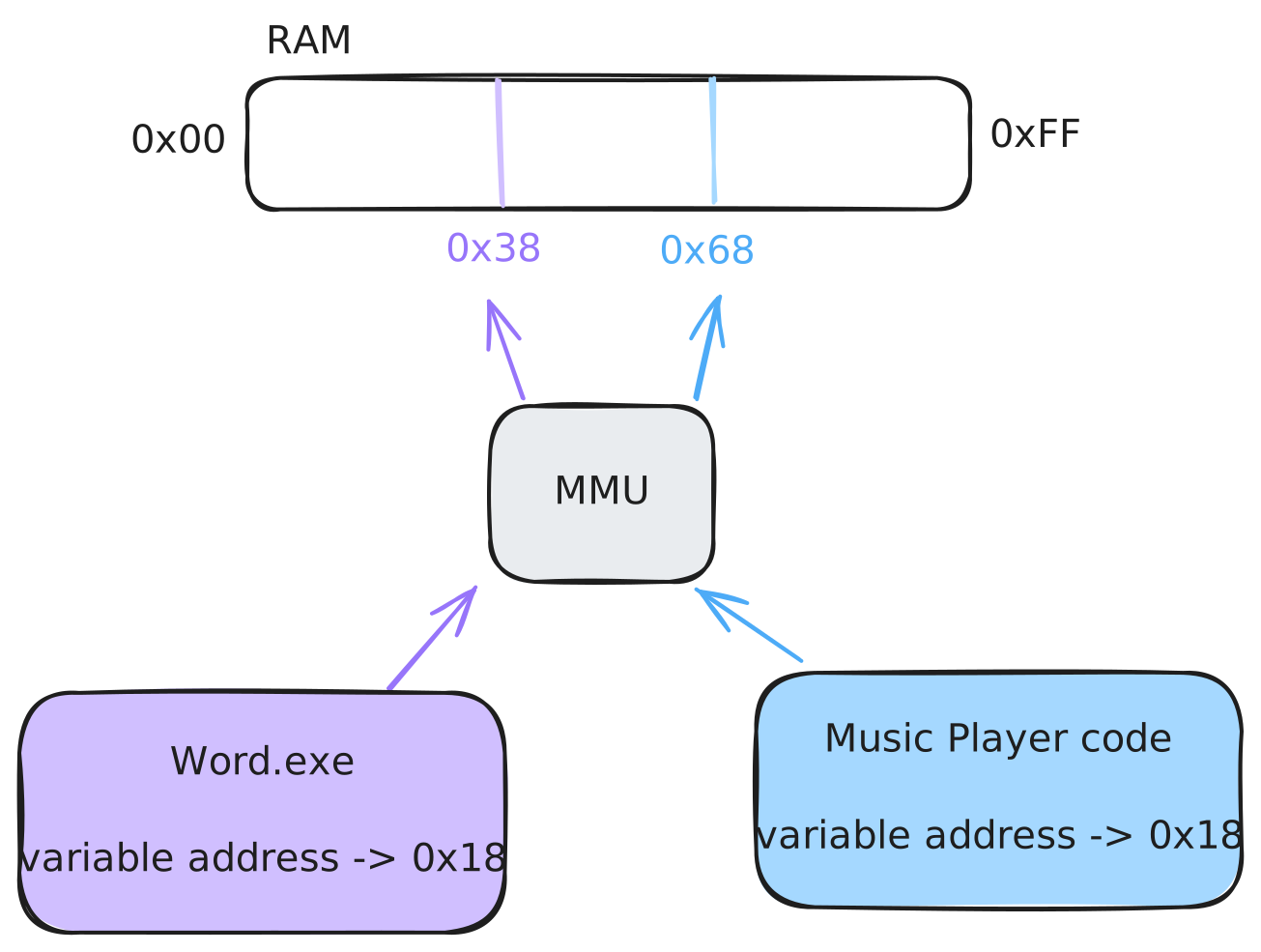
Two programs can use the exact same virtual address (e.g., 0x401000), but their page tables will map it to different physical frames. It is physically impossible for one process to corrupt another’s memory because it has no mapping to reach it.
Solving Fragmentation
Virtual memory solves external fragmentation by decoupling the virtual layout from the physical layout. A program can request a large contiguous block of virtual memory, and the OS can back it with any available physical frames, even if they are scattered.
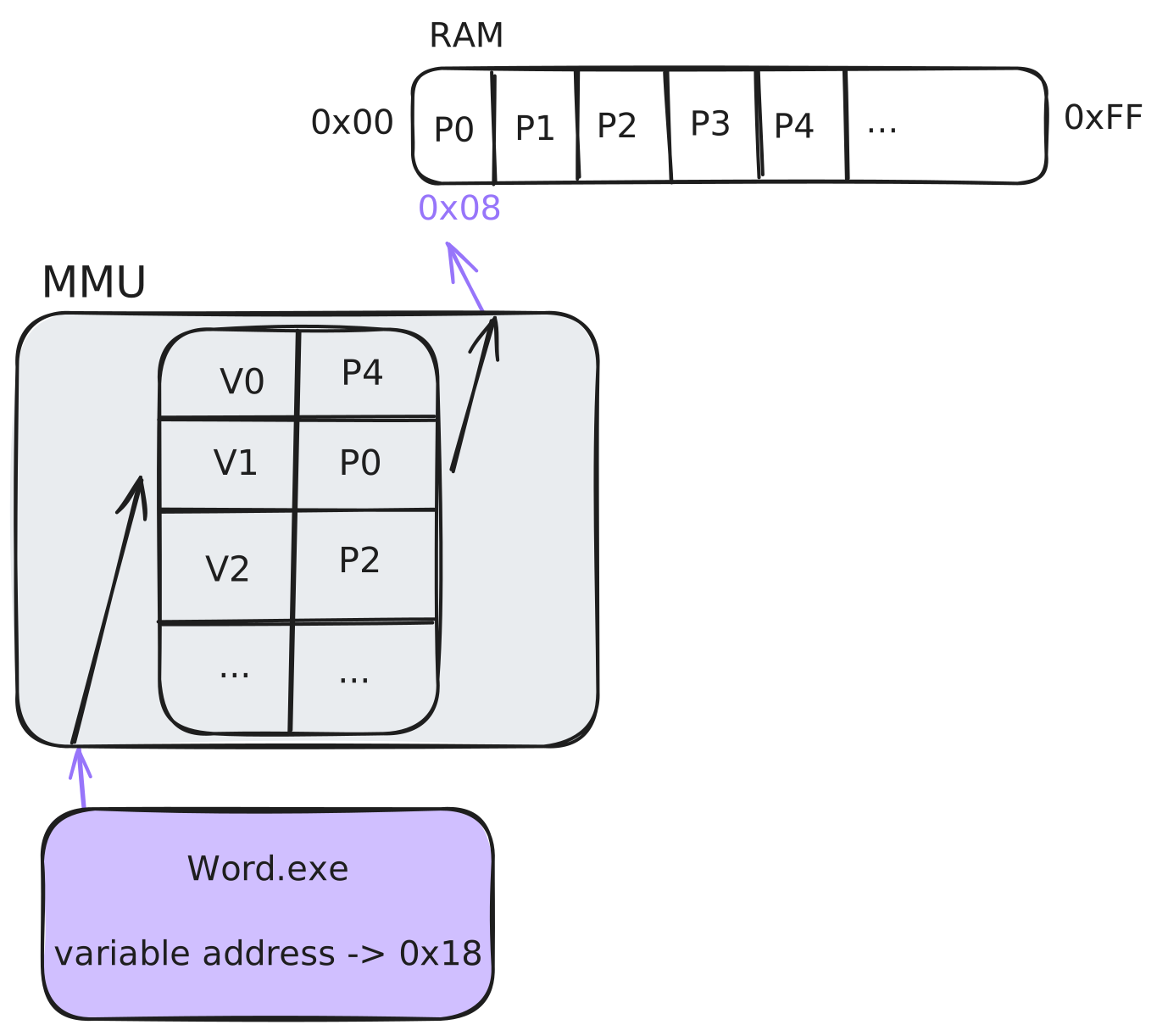
The program sees a contiguous block. The OS handles the physical scattering transparently.
Understanding the Page Fault
A page fault isn’t just for catching bugs. It is an essential mechanism that the OS uses to manage the virtual memory illusion efficiently.
When the MMU triggers a page fault because it cannot find a valid, present translation for an address, it passes control to the OS. The OS then inspects the situation to determine the cause. One powerful use case is Paging from Disk, where the OS can load needed data from the hard drive, creating the illusion of near-infinite memory. Another is what we’ll see next.
If a page fault is just a trigger for the OS to resolve a memory state, what if we, as programmers, could intentionally set up memory regions to cause a resolvable fault the first time we touch them? This is precisely what modern operating systems allow us to do, and it’s the foundation of the reserve/commit memory model, a process often called demand paging.
Demand Paging - Reserve and Commit
Modern operating systems allow us to reserve memory without consuming physical RAM. This is the reserve/commit model.
Step 1 - Reserving
When you reserve a block of memory (e.g., 1GB), you are not allocating any physical RAM or even space in the page file. You are simply telling the OS kernel:
See this huge, contiguous range of virtual addresses? I’m claiming that for my process. Allocate a descriptor for it, but don’t create any page table mappings yet. If my program tries to access it, there will be no valid translation, so treat it as an access violation.
At this point, you have a guaranteed contiguous block of addresses, but you have used almost no system resources. If you were to dereference a pointer into this range, the MMU would fault, the OS would check its records, see the memory is reserved but not committed, and raise a segmentation fault.
Step 2 - Committing
When you are actually ready to use a piece of that reserved space, you commit it. This action still does not typically allocate physical RAM. Instead, committing tells the OS:
Okay, for that specific 4KB virtual page I reserved, I intend to use it. Modify your internal structures so that it’s now backed by the system’s page file. Set up my process’s page table so that the entry for this virtual page is marked as valid, but points to its location in the page file, not to a physical frame. The ‘Present’ bit in the page table entry remains 0 (false).
Now, the memory is committed. The OS has guaranteed it can provide the memory when asked. The magic happens on the very first access.
Step 3 - Access
The first time you write to a committed page, the OS takes over.
- Your code tries to write to the committed page.
- The MMU sees the
Presentbit is 0 and triggers a page fault. - The OS page fault handler takes over. It checks its records and sees this is a resolvable fault, the page is committed but not yet in RAM.
- The OS finds a free physical frame, loads it with a page of zeros (since it’s a new allocation), updates the page table entry to point to this new physical frame, sets the
Presentbit to 1, and sets the correct read/write permissions. - The OS returns control to your program, re-executing the instruction that failed. This time, the MMU finds a valid, present translation and the write succeeds transparently.
Every subsequent access to that page is now direct and fast, with no faults. You only pay the physical RAM and performance cost for the pages you actually touch, when you touch them.
On Windows
const size_t ONE_GIGABYTE = 1024 * 1024 * 1024;
const size_t PAGE_SIZE = 4096;

// 1. RESERVE: Carve out a 1GB contiguous chunk of the virtual address space.
// This only allocates a Virtual Address Descriptor (VAD) in the kernel.
// No physical RAM or page file space is used.
void* block = VirtualAlloc(
    NULL,
    ONE_GIGABYTE,
    MEM_RESERVE,
    PAGE_NOACCESS
);

// ...

// 2. COMMIT: Back the first page of the reservation with the page file.
// This doesn't allocate physical RAM yet. It just updates the page table
// entry to be valid, but marked "not present".
VirtualAlloc(
    block,
    PAGE_SIZE,
    MEM_COMMIT,
    PAGE_READWRITE
);

// ...

// 3. FIRST ACCESS: This write operation is where the magic happens.
// It triggers a resolvable page fault. The OS allocates a physical frame,
// maps it, and the instruction completes.
int* data = (int*)block;
*data = 123; // <-- Page Fault occurs here!

// All subsequent accesses to this page are fast and will not fault.
*data = 456; // <-- No fault.
On Linux/macOS
The POSIX model is slightly different but achieves the same goal. mmap with PROT_NONE reserves the virtual address space (by creating a VMA - Virtual Memory Area). mprotect makes it accessible. On Linux, anonymous private mappings are typically handled via copy-on-write with a shared page of zeros. The first write triggers the page fault that allocates a private, writable physical page for the process.
const size_t ONE_GIGABYTE = 1024 * 1024 * 1024;
const size_t PAGE_SIZE = 4096;

// 1. RESERVE: Map a 1GB chunk of virtual address space with no permissions.
// The kernel creates a Virtual Memory Area (VMA) for this range.
void* block = mmap(
    NULL,
    ONE_GIGABYTE,
    PROT_NONE,
    MAP_PRIVATE | MAP_ANONYMOUS,
    -1, 0
);

// ...

// 2. COMMIT (effectively): Change permissions to make the first page accessible.
// This updates the VMA. The kernel now knows that access is permitted.
// No physical page is allocated yet.
mprotect(
    block,
    PAGE_SIZE,
    PROT_READ | PROT_WRITE
);

// ...

// 3. FIRST ACCESS: This first write triggers a page fault. The kernel sees
// the page is a new, private, anonymous page. It allocates a physical frame
// of zeros, maps it with read/write permissions, and resumes the process.
int* data = (int*)block;
*data = 123; // <-- Page Fault occurs here!

// Subsequent accesses to this page are fast.
*data = 456; // <-- No fault.
Conclusion
That’s virtual memory. The reserve/commit pattern gives you a way to grab huge contiguous address ranges without paying for physical RAM upfront. You only pay for what you touch, when you touch it.
Next up, we’ll put this to use and build a Virtual Memory Arena, a simple allocator that reserves a big block upfront and commits pages as you allocate.